Prevent AI to read your .env file
How to prevent GitHub Copilot from accessing sensitive .env files in VS Code
Keeping Your .env Files Safe from GitHub Copilot#
If you’ve ever worked with GitHub Copilot inside VS Code, you might have wondered: is Copilot peeking into my .env file?
That file is where API keys, tokens, and other sensitive credentials usually live. And while .gitignore stops them from leaking into your repo, it doesn’t guarantee that Copilot (or other extensions) won’t see them.
Let’s walk through what actually happens, what tools exist to mitigate the risk, and the simplest way to keep your secrets private.
What’s Really Happening#
- VS Code indexes everything: By default, VS Code scans your entire workspace to provide IntelliSense, search, and extension features.
- Copilot builds on that index: Even though
.envis ignored by Git, it’s still indexed locally. - If you open
.env, it’s fair game: Once you open the file, its contents can appear in Copilot’s context and even leak back into code suggestions. - Other extensions may also access it: Just because Copilot usually avoids
.gitignorefiles doesn’t mean other VS Code extensions will.
So while .env isn’t automatically leaked, the risk is real.
The “Heavy” Option: Dotenvx#
There’s a library called dotenvx ↗, built by the creator of dotenv, that encrypts your .env file.
- It generates an encrypted
.env.encryptedand a private key.env.keys. - You run commands with a prefix like:
"scripts": {
  "dev": "dotenvx run -- next dev --turbopack",
  "build": "dotenvx run -- next build",
  "start": "dotenvx run -- next start"
}- During runtime, dotenvx decrypts and injects your variables.
The catch:
- In React Native, you need to manually decrypt before building.
- In Next.js + Vercel, you must ship the encrypted file and configure a decryption key. Encrypted values can’t be used directly in Vercel’s settings.
- The tool is still young, with frequent breaking updates.
Great idea, but probably too much friction for most workflows today.
The “Lightweight” Option: VS Code Exclusion#
A more practical solution is simply to keep .env files out of VS Code entirely. That way, Copilot and other extensions never index them.
How to exclude .env files#
-
Open VS Code settings (
CMD + ,on macOS). -
Search for “exclude”.
-
Under Files: Exclude, add:
plaintext**/.env*
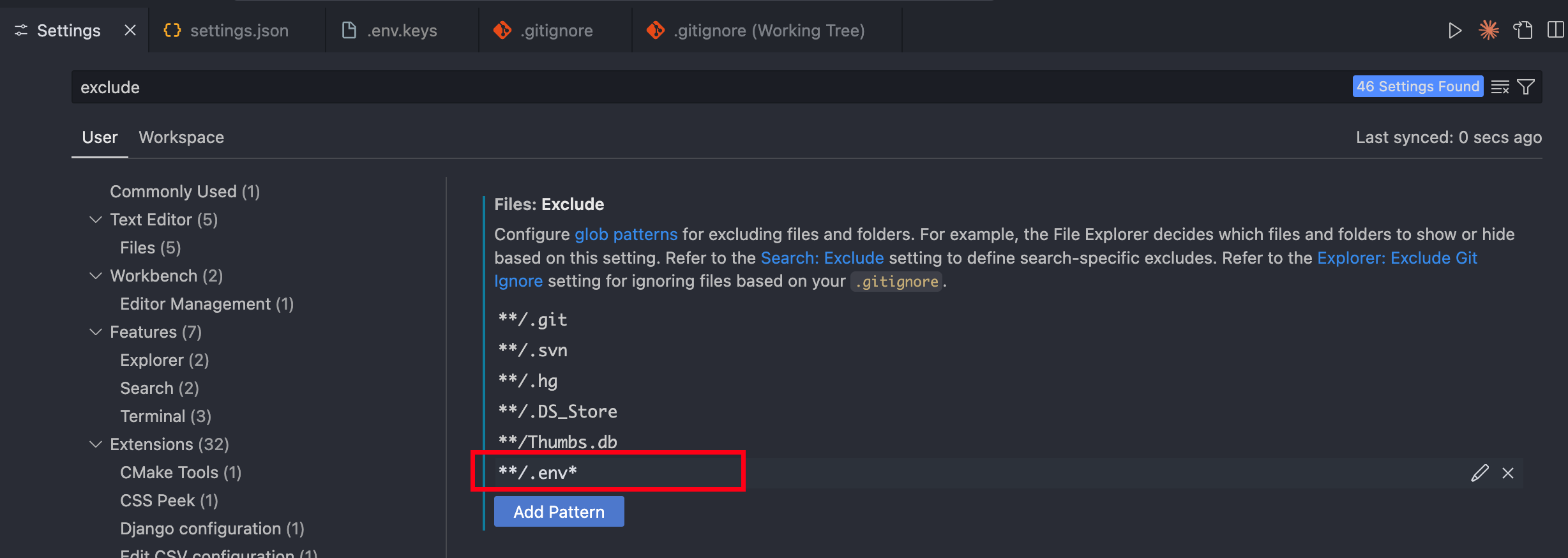
Your .env files will instantly disappear from the Explorer and stop being indexed.
How to view .env safely#
Open them with a lightweight editor outside VS Code. For example, on macOS:
open .env # Opens in TextEditOr use Sublime Text, Notepad++, or any other simple editor.
Why This Matters#
Imagine asking Copilot to generate a function that uses your API key, while the .env file is open. Copilot might “helpfully” autocomplete with your real key. Not only is that a security risk, it’s a nightmare if snippets get copy-pasted, logged, or shared.
By excluding .env files, you cut off that risk completely with almost no workflow change.
Takeaways#
- Copilot doesn’t automatically read
.env, but it can if the file is open. - Dotenvx encrypts env files, but it’s heavy for day-to-day use.
- Excluding
.envin VS Code is the fastest, lowest-effort way to protect secrets.
A single exclusion rule in VS Code keeps your credentials private, keeps Copilot useful, and saves you from accidental leaks.