Android Studio google pom failed to respond
Fix Gradle build failure when VPN proxy conflicts with Android Studio's network config
Context#
- Environment:
- Physically in China
- Have VPN turned on
- What I was doing:
- Building Android app for RN
The Error#
❯ ./gradlew assembleDebug

FAILURE: Build failed with an exception.

* What went wrong:
A problem occurred configuring root project 'Feed4Ward'.
> Could not resolve all dependencies for configuration ':classpath'.
   > Could not resolve com.android.tools.build:gradle:8.7.2.
     Required by:
         root project :
      > Could not resolve com.android.tools.build:gradle:8.7.2.
         > Could not get resource 'https://dl.google.com/dl/android/maven2/com/android/tools/build/gradle/8.7.2/gradle-8.7.2.pom'.
            > Could not GET 'https://dl.google.com/dl/android/maven2/com/android/tools/build/gradle/8.7.2/gradle-8.7.2.pom'.
               > dl.google.com:443 failed to respond
> There is 1 more failure with an identical cause.

* Try:
> Run with --stacktrace option to get the stack trace.
> Run with --info or --debug option to get more log output.
> Run with --scan to get full insights.
> Get more help at https://help.gradle.org.Root Cause#
Since I have VPN, the proxy that VPN have config is different with the one that Android studio is using.
VPN’s config:
- The Proxy port is at
8118, - The Outbound Mode is “Rule-based Proxy”
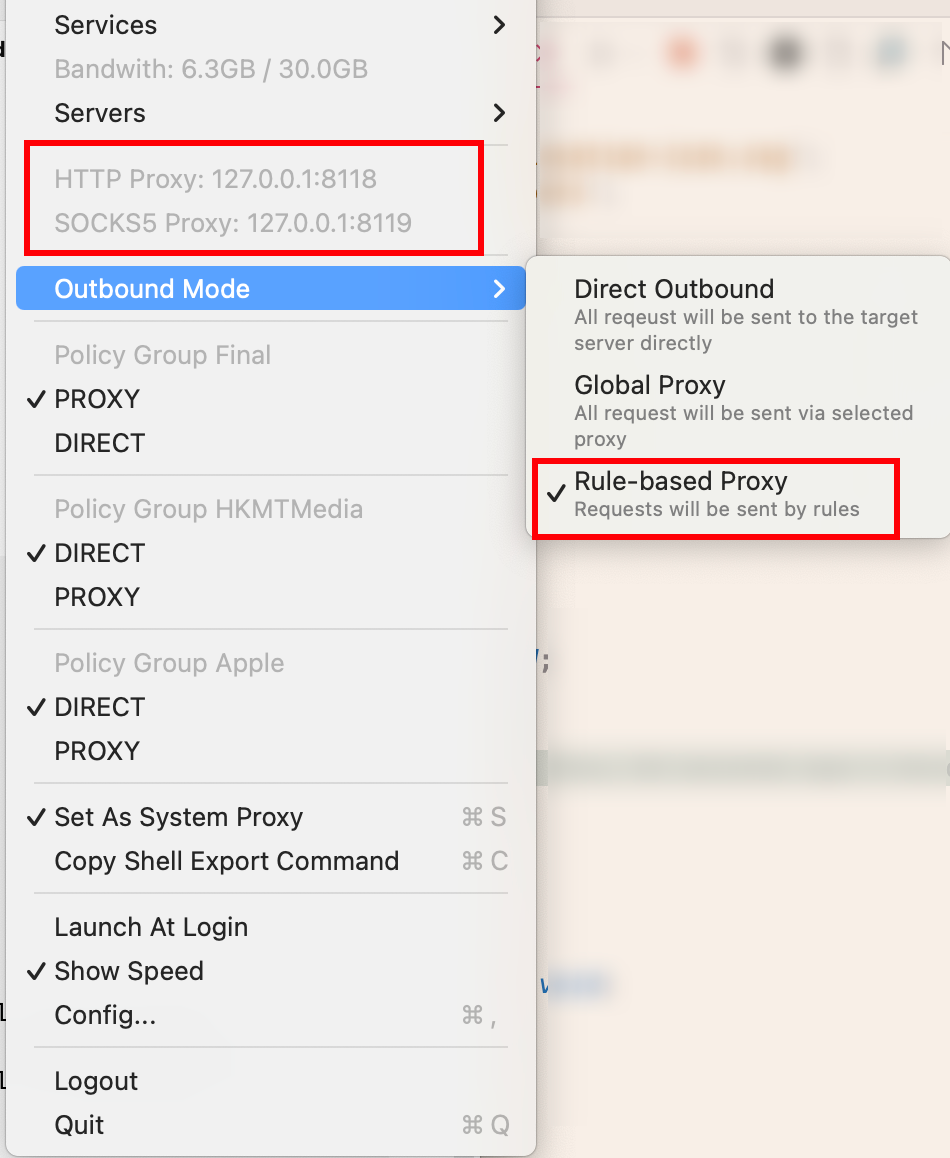
The network config that Android Studio uses (in ~/.gradle/gradle.properties):
## For more details on how to configure your build environment visit
# http://www.gradle.org/docs/current/userguide/build_environment.html
#
# Specifies the JVM arguments used for the daemon process.
# The setting is particularly useful for tweaking memory settings.
# Default value: -Xmx1024m -XX:MaxPermSize=256m
# org.gradle.jvmargs=-Xmx2048m -XX:MaxPermSize=512m -XX:+HeapDumpOnOutOfMemoryError -Dfile.encoding=UTF-8
#
# When configured, Gradle will run in incubating parallel mode.
# This option should only be used with decoupled projects. For more details, visit
# https://developer.android.com/r/tools/gradle-multi-project-decoupled-projects
# org.gradle.parallel=true
#Tue Nov 11 17:42:54 CST 2025
systemProp.http.proxyHost=127.0.0.1
systemProp.http.proxyPort=1080
systemProp.https.proxyHost=127.0.0.1
systemProp.https.proxyPort=1080The Fix#
1. Use Socks Proxy instead of Http/Https proxy for Android Studio#
In ~/.gradle/gradle.properties, replace the existing proxy setting with:
systemProp.java.net.useSystemProxies=false

# Use SOCKS instead (Clash exposes SOCKS on 127.0.0.1:8119 from your screenshot)
systemProp.socksProxyHost=127.0.0.1
systemProp.socksProxyPort=8119
systemProp.socksProxyVersion=5

# Recommended for avoiding IPv6 routing issues
org.gradle.jvmargs=-Djava.net.preferIPv4Stack=true2. Ensure Android Studio is No Proxy#
Settings → System Settings → HTTP Proxy → No proxy
When that popup appears, select: No (Do NOT keep global gradle proxy settings)
3. Repo config sanity check#
Make sure you have these in your top-level build.gradle or settings.gradle:
repositories {
    google()
    mavenCentral()
}4. Change VPN Config#
Change Outbound Mode to Global Proxy
5. Restart Gradle#
./gradlew --stop
./gradlew --no-daemon --refresh-dependencies6. Build Project#
# from android/
./gradlew assembleDebugSummary#
The dl.google.com:443 failed to respond error happens when Gradle’s proxy settings don’t match your VPN’s actual proxy port. Switching to SOCKS proxy and setting the VPN to Global Proxy mode fixes the mismatch.